A Beginner’s Guide to Web Application Testing

As we know that web apps are becoming more complex, testing them is also getting equally sophisticated. The stats show that 88% of online buyers are less likely to repeat the orders if the website has bad UI/UX. Hence, it is important to perform thorough testing of web apps to ensure that it has standardized user experience, functions, and security.

For the testing process, there are many automation testing tools available along with manual testing tools. Automation tools help in reducing the risk of making human errors while testing any system and also enhance the accurate consistency of the test results. In this article, we will see more about top web app testing tools to learn in 2023. So, let’s dive in!

What is Web App Testing?

Web app testing, or web testing is a process in the SDLC that ensures that the quality of the software and its functionalities are as per the intended requirements of the clients.

The web app testing process also allows you to find errors at any given time before the app or project is released.

Testing any project is quite important before it is released for users to use it. If it is not checked and tested properly, it might cause a heavy crash of that software and also cost you a hefty money expense.

To make the testing process easier, we rely on web app testing tools – that may be open source (free to use) or commercial (paid tools). There might be pros and cons to using each of these, the decision you make regarding the tools to be used is based on your team’s need, budget and resources.

Pros and Cons of Open Source Testing Tools

ProsCons
The primary advantage of having an open-source testing tool is the cost of entry. Open-source tools like Selenium can be used free of cost.
If your team is working with a client who is cost conscious, using free tools is an amazing alternative.
Another benefit is the flexibility that testers can get by using open-source tools. Some tools have a large user community behind them. And there are some cool libraries too that can be used easily.
Moreover, open-source tools also support different languages. For instance, Selenium offers support for different languages like Python, Java, C#, etc.
The foremost disadvantage of open source testing tools is the technical barrier of entry.

Quality is also an underrated con of continuing with different open source testing tools.

If you are the leader of the testing team who does not have any automation professionals, then open source testing tools can develop some problems. In such cases, a commercial testing tool is a better option.

Pros and Cons of Commercial Testing Tools

ProsCons
There are various advantages of Commercial testing tools, that is you do not need a robust in-house skill set to start and run. Different commercial tools use in-built workflows that can make striking the ground off much smoother.

Commercial testing tools also have in-built support and documentation that is huge. There is much documentation available in a well-written format which is easy to use for testers.
 
High team support is also an advantage of commercial testing tools. You can contact the team managing the tool, in case of any emergency arises while using the tool.

The in-built feature of reporting present in commercial testing tools is also considered as their main advantage. However, the custom reporting feature of open source tools is also useful.
One of the main disadvantages of using commercial testing tools is its cost. These tools are prohibitively expensive and users need to pay subscription rates to use them.
Either annually or monthly fees have to be paid for using the tool.

These tools are not flexible like open-source testing tools. Hence these tools are only used while testing particular tasks. If you try to test things that are out of the box for commercial tools, it may drastically fail.

Here we will discuss the best tools available for web app testing. These tools will help you find the hidden bugs and process them further until they are removed.

Web Application testing tools

Let’s discuss the list of top web app testing tools that are trending at the current time:

Selenium

It is an open-source web automation testing tool and is the most widely used tool in the modern era of critical testing. Selenium is one of the best tools which automates across different OSs like Mac, Linux, and Windows and also on browsers like Chrome, Firefox, IT, etc.

The test script of Selenium can be written in any programming language like Java, Python, C#, Ruby, PHP, JS, and Perl. This tool also offers record & playback features with a simple browser add-on named Selenium IDE. There’s a POWERFUL Selenium WebDriver that helps you develop more advanced and complex automation testing scripts.

Here are some features of Selenium:

  • It has multi-browser support
  • Selenium provides multi-language compatibility
  • Quick identification of errors and use of quality web elements
  • Good performance feature
  • It also provides dynamic web elements for the use
  • Selenium is open-source and free to use
  • It is portable, which means it works easily with different OSs
  • It also has a reusability feature for testing scripts

Katalon Platform

Katalon is a comprehensive automation solution for Web, API, Desktop, and Mobile app testing. With a strong user base of more than 0.5 million, both experienced and beginners test engineers can relish its practical and versatile features for an easy testing process.

Integration platforms: Azure DevOps, BrowserStack, Circle CI, etc.

Supported Platforms: Linux, Windows, MacOS

It also provides a 30-day free trial.

Here are the features of the Katalon Platform:

  • It is flexible in testing design. Beginners in automation testing can use playback and record functions for making tests quickly. While the experts can use in-built keywords for improved productivity along with advanced scripting capacities.
  • Easy selenium migration is possible with TestNG/JUnit framework
  • It can execute powerful tests and has cross-browser automation tests along with CI/CD pipeline integrations.
  • It supports testing methodologies like Page Object Model Testing, Keyword-Driven testing, TDD/BDD testing, etc.
  • It reduces test maintenance effort and cost
  • You also get a centralized report dashboard

Testpad

Testpad tool is a simple and more accessible manual testing tool that is a good option for testing web apps. It prioritizes pragmatism over the process and uses checklists like test planning that can be in the form of various ranges of styles like Agile’s manual testing side, exploratory testing, BDD syntax highlights, and also traditional test case management.

Integration platforms: Jira, GitHub, Pivotal, etc.

Supported Platforms: Linux, Windows, Web apps, etc.

It also provides a 30-day free trial.

Here are the key features of the Textpad tool:

  • Guest testers are invited by a simple email, and they do not need special accounts to handle the testing process
  • Simple to use even by non-testing professionals. Everyone can help in the testing process when required
  • It has drag and drop feature for test plans
  • There’s an editor that is Keyboard-driven with JS-powered UI
  • It is a lightweight tool with issue trackers and JIRA

Intruder

intruder is also a powerful error scanner that will assist you to uncover different weaknesses lurking in the web apps and underlying infrastructure. It offers powerful security checks, timely and continuous monitoring, and also it is an easy-to-use tool. Intruder tools will keep your web app safe from hackers.

Integration platforms: GitHub, ServiceNow, Slack, Teams, etc.

Supported Platforms: Windows

It also provides a 14-day free trial.

Here are the features of Intruder:

  • It has best-in-class coverage of threats that covers over 10,000 security checks
  • It checks for missing patches, configuration weaknesses, and app weaknesses like SQL injection, Cross-site scripting, etc.
  • Automatic prioritization and analysis of scan results
  • Automatic analysis and priority of scan results
  • It has an intuitive interface, easy to set up and execute your scans
  • It takes proactive security testing for modern vulnerabilities
  • AWS, Google Cloud, Azure connectors
  • API integration is easy with CI/CD pipeline while using this tool

testRigor

This tool assists you to express the tests directly as executable specifications are made in English. Users belonging to different technical firms can develop a full test case, small/medium/complex which converts web, mobile, and API in one test. Test steps are made as per the end-user level instead of just relying on details of XPaths, and CSS Selectors.

Integration platforms: TestRail, Zephyr, XRay, Jira, etc.

Supported Platforms: Windows, iOS, MacOS

It also provides a 14-day free trial.

Here are the features of testRigor:

  • It has a free-forever public version
  • Test cases are made in English
  • Recorder facility for web steps
  • Unlimited tests and unlimited users
  • testRigor is the easiest tool to learn automation
  • Easy integration with CI/CD
  • Helps in test case management
  • SMS & Email testing
  • Web, Mobile, and API steps in the test

Many More

The list is endless with fantastic tools like QA Wolf, TestSigma, and many more.. You can pick the one you like and that fits the needs of your team and project.

Final words

There are many web app testing tools present in the market that can greatly change the effectiveness and efficiency of the testing process. These tools ultimately offer a huge range of features and expertise that allows you to conduct comprehensive testing and ensures that the reliability and quality of your web app are not compromised.

Selenium is a well-known tool amongst testers as it is versatile and robust to use. The ability to automate the browser functions and support various programming languages makes it an easily flexible and suitable tool in many scenarios.

Moreover, tools like TestComplete, Appium, SoapUI, etc., are worth considering and depend on your particular testing needs. The final choice of picking any web application testing tool will depend on your needs, budget, and expertise. By using any of these top tools, one can streamline the testing process, search for bugs, solve them, and finally deliver high-quality web apps which provide a beautiful user experience.

<This is a Guest Post by Colin Rooney>

<Author Bio: Colin Rooney is a Technical Consultant at a reputed web development company. He has expertise in developing enterprise level web applications in various domains such  as PHP, Laravel, magento and React JS. He loves to share his bylines through blogs. You can find his blogs on many famous websites.>

Tips and Tricks to Master API Testing in Postman

Modern software development relies on successful software testing services sessions. Postman is currently the best tool for challenging requests. It accomplishes your work involving primary APIs in diverse environments. A well-versed developer can undertake test automation and scripts with monitors. Organised and scheduled tests with team collaboration also can be conducted. They are critical for the efficiency, reliability, and overall effectiveness of this practical tool.

In the context of the increasingly interconnected global landscape, APIs have emerged as a crucial component in contemporary software growth practices. Consequently, API test has emerged as an essential element within the software development life cycle. Postman is widely recognized as a prominent means for API testing, owing to its considerable popularity and apparent advantages. This robust tool empowers developers to efficiently develop, and verify the (APIs). 

By offering a straightforward interface as well as a comprehensive set of functionality, Postman makes it possible for developers and API testers to streamline the procedure of testing (APIs). It does not matter whether you have years of experience as a software engineer or are just starting in the field of API testing; it is necessary to have a basic grasp of Postman to make full use of its capabilities.

In this article, we will thoroughly examine the software tool known as Postman and delve into various strategies and techniques which could successfully harness its extensive capabilities.

Ahead we will augment your skill sets as an experienced developer. If you are new and learning to adapt, it will encourage you to explore a wide variety of features of this tool. Eventually, it will not just be the proverbial ‘Postman’ exchanging and delivering requests. It will become the ideal go-to API testing solution as you become a Postman guru. 

Disclaimer:
We presume you have already installed Postman, the amazing tool for Application Programming Interface aka API testing. The following blog will only focus on the tool’s credibility for skilled developers. Using various features you can share requests, and create and test documents/files. The tool accepts requests to save complexities related to HTTP and read responses coming from the client-server.

POSTMAN Syntax

GET retrieves data from an API.

POST sends new data to an API.

PATCH and PUT update existing data.

DELETE removes existing data.

5 tips that make Postman beneficial 

  1. Collating all tests with collections.
  2. Managing test data under different environments.
  3. Automation with scripts. Use the API login token for all requests.
  4. Monitors for scheduled test runs. 
  5. Sharing results with the team and taking quick decisions on requests.  
Read More »

Agile Testing Strategies for Successful Software Development

Agile software development has become the modern gold standard in programming and tech innovation. Known for its dynamic and flexible methodology, Agile is rooted in customer satisfaction, consistent delivery, teamwork, and the capacity to adapt to changes.

However, central to the Agile methodology is a component that often goes unappreciated – testing.

No matter how elegant or efficient the code is, thorough testing is necessary for it to succeed. This post will dive into the critical role of testing within Agile, demonstrating how it aligns with programming & source control best practices, such as using Git, implementing effective web development strategies, and leveraging Azure. By exploring various testing strategies, we aim to shine a light on enhancing your software development process for success.

Understanding Agile Testing

Agile testing is a critical part of the Agile methodology. Unlike traditional testing methods, it is integrated into every stage of development rather than being a separate phase. This approach ensures that issues are identified and resolved quickly, facilitating a smoother development process.

The key principles of Agile testing include:

  1. Continuous Testing: Test early; test often. Agile testing happens continuously throughout the development process.
  2. Team Involvement: Everyone on the Agile team participates in testing, not just designated testers.
  3. Feedback and Improvement: Agile testing thrives on feedback, adapting, and improving as the project progresses.

Unlike traditional testing methods that usually occur after coding is complete, Agile testing runs concurrently with development. This continuous, intertwined process allows for rapid adjustments, reduces bug accumulation, and ensures that the final product aligns more closely with user needs. Agile testing’s essence is flexibility, frequent communication, and adaptability, instrumental to successful software development.

Agile Testing Strategies

Navigating the dynamic waters of Agile software development requires robust, adaptable testing strategies. These methods facilitate quality assurance, swift error detection, and effective communication, all while keeping the user’s needs at the forefront.

Read More »

What is Smoke Testing: A Complete Guide

While the software development process is going on. It is necessary to test various functions of the software repeatedly. Repeated testing ensures that the software is working in an intended manner and bugs (if present) are eliminated.

Many software development companies use smoke testing to find if the project is ready for end users’ use or if are there any more necessary changes in the software.

When in-depth testing is done, the chances of solving even the smallest bugs increase. In this article, we will understand what smoke testing is, along with its benefits, risks, and when to use this technique. So, let’s dive into this together.

What is Smoke Testing?

Smoke test, aka, confidence testing, is a process to know the functionality, stability, integration ability, and efficiency of the project under development.

One can also call this process verification testing as the test checkers for errors with the software build. This technique generally involves multiple tests that testers can conduct manually or use automated test methods.

Testing different software components can enable the testers to discover breaches in the code issues without using more valuable assets. Smoke testing also helps the QA team to determine whether the software is ready to release or might require additional development and testing work.

Why is Smoke testing required?

Smoke testing is a process that is performed in the phase of software when it is released to the QA and testing team. Consider a situation where an eCommerce app is deployed in the testing phase, but when the tests are going on, it is found the user is not allowed to log into the app to proceed and perform different tasks; or one can say- the user is blocked from using the app because he/she is not able to perform basic login activities.

Then there is no meaning in performing detailed and exhaustive testing of other major modules of the app. First, the development team has to solve the issue where users cannot log in to the app. Such issues are determined and solved first while performing smoke testing.

Here are some prime reasons why smoke testing is used while developing software or an app:

  • Smoke testing finds major issues in the app in the beginning only
  • It helps in reducing the efforts and time of the QA team that could be wasted if the project is not stable
  • With smoke testing one can make early identification of the defects
  • It increases the stability of the software or app developed

Why is this technique called ‘Smoke’ testing?

Read More »

Testing Web Accessibility- Dive into tools, myths, and facts 

Testing a web application ensures that each user can use the site. Web accessibility testing is a specialized test that ensures websites are effective in digital accessibility testing.  

Additionally, guidelines for web accessibility testing are essential to follow. World Wide Web Consortium has set four rules for accessibility testing – perceivable, operable, understandable, and robust. Plus, companies can use three conformance levels – A, AA, & AAA – in their testing life cycle.  

A well-designed accessibility testing focuses on balancing the needs of people with disabilities – helps match the needs to best techniques, automate the test case and use clear language for expression.  

Let’s dive deep into the myths, and facts about testing web accessibility  

1. MYTH: Website accessibility is expensive, plain, and boring 

FACT: When you think of accessibility issues at the design stage, it reduces the cost. Accessibility does not mean that the site should contain only text. You can add more images and make them attractive and accessible for all.  

2. MYTH: WCAG benefits people who have low vision or are blind 

FACT: While ensuring that your site is accessible to all the people who are blind or have low vision, there’s no single access needed that dominates WCAG’s success criteria. Some disabilities may be permanent, while some temporary.  

3. MYTH: Automated tools ensure complete site accessibility 

FACT: No automated tool can help to solve total site accessibility. As such, these tools are cost-effective and can help to identify a broad range of issues across sites but keep in mind that 75% of WCAG site criteria – aren’t even tested.  

4. MYTH: Developers are responsible for making a site accessible 

FACT: Though developers play a central role, the responsibility of meeting WCAG success criteria rests on many people like – designers, content authors, UX specialists, and project managers. Making the sites accessible is a team effort.   

5. MYTH: Using web content Accessibility Guidelines (WCAG) is vital to achieving WCAG conformance 

FACT: Using the WCAG techniques is not important for achieving WCAG conformance. However, they can help you get closer to the goal to an extent. What matters is your digital assets meet the required WCAG success criteria.  

6. MYTH: Converting the inaccessible site to an accessible one is time-consuming 

FACT: It’s important to prioritize things and work on basic needs so it’s not time-consuming.  

Here are some Tools for Testing Web Accessibility

Conclusion 

Web accessibility testing provides easy access to users with a disability and added challenges. It increases the audience reach and market share and improves efficiency and maintainability.  

Moreover, you should follow different software testing trends. In short, by leveraging the emerging trends and implementing accessibility testing in the testing process, will help teams ensure the site’s content is accessible to all users without glitches. 

Accessibility testing simplifies the process of navigation and how you can understand software and site needs. Moreover, it is for all users, and testing can be done for everyone.  

Like other testing ways, you can do it manually or using different automation tools. However, it’s vital to check whether the guidelines are fulfilled or not and how user-friendly the process is.  

<This is a guest post by Harikrishna Kundariya>

Author Bio:

Harikrishna Kundariya, a marketer, developer, IoT, ChatBot &amp; Blockchain savvy,designer, co-founder,Director of eSparkBiz Technologies. His 12+ years of experience enables him to provide digital solutions to new start-ups based on IoT and SaaS applications.

My experience speaking at World Test Engineering Summit (in-person, Bangalore)

It has been a while since I have made it to an in-person event. So, this one was extra special.

Though, a very busy week (or perhaps month 😛 ) left little time to prepare for my talk, I was excited for the day and to present in person, network and meet people at the conference. And the day matched my expectations!

It was really fun presenting to such an engaged crowd and I was amazed at the response and feedback I received during and after the session! There were some great discussions, very keen participants sharing their own stories & experiences and many fantastic comments by the delegates.

My Topic was – “Keep the Wheels of Continuous Testing in Motion”

Here are the details of the event and my session

The event was also a great platform to meet people and teams from esteemed organisations. I spent time chatting with very talented people and made some great connections.

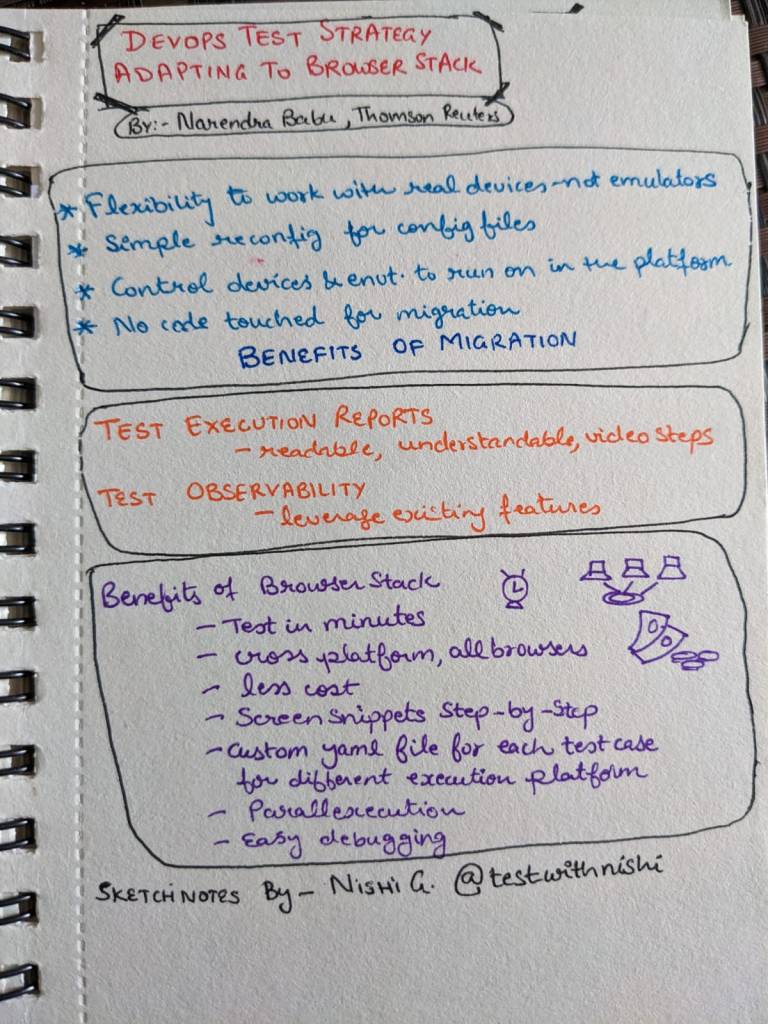
I also took this opportunity to dust off my Sketch notes pad 🙂 I made sketchnotes for some interesting sessions of the day.

I thank 1point21GWS team for having me as a part of this esteemed speaker panel.

I am always grateful for opportunities like this and always look forward to more such days!

Happy Testing!

Nishi

Why Customer Experience Directs the Software Testing Strategy?

<This is a guest post by Nishil Patel>

Digital development and customer experience run parallel with each other. Thus, businesses
across the world majorly focus on customer satisfaction as it is the only key to success. The
way businesses are operating has changed drastically in the past few years. However, it is
the one thing that will not change is the customer impact.
It means if your product or service doesn’t appeal to your audience, then you must focus on
improving them. There is no doubt that marketing will help you to some extent, but you will
not go too far. Significantly when it comes to software testing, customer experience is still a
priority. It is the base of the testing strategy that guides the testers and developers to
make it the best.

Customer-Centric Testing Approach

The customer-centric testing approach revolves around prioritizing the user experience over
rigid specifications and aims to automate exploratory testing to enhance speed and
scalability. In this approach, the main focus is on understanding and meeting the needs and
expectations of the customers.

This customer-centric testing approach goes beyond traditional testing methods that solely
rely on predefined test cases and requirements. Instead, it embraces a more adaptive and
dynamic approach that allows for continuous feedback and improvement.

By continuously monitoring and analyzing the user experience, testing teams can proactively identify areas of improvement and make data-driven decisions to enhance the overall user satisfaction.
By leveraging machine learning and AI, organizations can scale their testing efforts while
ensuring a high degree of accuracy and efficiency. The intelligent algorithms can process
vast amounts of data and provide actionable insights, enabling testing teams to optimize
their testing strategies and prioritize their efforts based on the most critical areas affecting
the user experience.

Key Aspects of Customer Experience

Customer experience plays a vital role in strategizing software testing. To understand how,
let’s have a look at the following points.

1- Trends in social media

Businesses nowadays should be transparent for an effective communication flow with the
customers. A wide range of social media such as Twitter, Facebook, etc. provides you with
direct feedback. Furthermore, you can easily expand your target audience and improve
customer loyalty.

2- Human approach

Every growing business focuses on improving customer behavior. It also helps in
understanding the current and upcoming demands. Gathering information such as
requirements, customer behavior, cultural behavior, etc. prompts innovation to bring new
ideas.

3- Regular improvements

Just gathering feedback from the customers will do nothing. As an organization, you must
respond to them. The task of creating a positive impact becomes easy when you start
solving the doubts and problems. This feedback will lead the testing and development team
to know where they lack and rectify the issues smoothly.

Read More »

I am speaking at ‘The World Test Engineering Summit’, Bangalore

I am glad to announce that I will be speaking at the 7th World Test Engineering Summit happening in Bangalore this month! And, this will be my first in-person conference since 2020, so I am even more excited for it!

The event will deliver in-depth content targeted at architects, developers, testers, integrators and managers by offering lectures and technical session to share expertise on the latest technologies, trends, tips and techniques. It is a great opportunity to present, learn, and challenge modern testing technologies and strategies!

This conference is split into two days with the first day being focused on Quality Assurance, Microservices and Serverless while Day 2 will focus on Agile Testing, Test Automation and Technology.

Here are the details of the conference and the schedule.

Check out the topic of my talk and the details on 23rd June.

Topic : Keep the Wheels of Continuous Testing in Motion

Description : Continuous testing is the way toward continuous delivery. Software teams must strive for continuous improvement of their continuous testing strategy. The key there is to embrace the continuity.The constant pressure of ‘speed to market’ needs testing to evolve and adapt. The factors that can help to keep the wheel of continuous testing in motion are both external and internal. Testers look outwards for priorities, collaboration and transparency; while they look inwards to reimagine processes, templatize lightweight documentation and recreate their own way of life in the testing world! Let us discuss ways we can plan, strategise and conduct software testing that befits continuous software delivery.

ERP Trends for the Future

<This is a guest post by Scarlett Hunter>

What is ERP

ERP (Enterprise Resource Planning) is a software that provides a suite of applications to manage the core processes of a business. These processes include finance and accounting, human resources, supply chain, procurement, manufacturing, and customer relationship management. ERP systems are designed to automate and integrate core business processes, providing all information at a single source for easy decision-making.

ERP systems come in different types, and they can be classified based on an organization’s needs, budget, and preferences.

Types of ERP Systems

On-Premise ERPThis type of ERP system is installed on the organization’s in-house servers and hardware. It is maintained and handled by the organization’s IT department. Although it provides greater control over the system, the cost of implementation, hardware, and maintenance is usually high.
Cloud-Based ERPThe software is hosted on a cloud server, and organizations access it via the Internet. They only pay for the software features and modules they need, and the providers generally take care of the hosting, maintenance, and updates. Cloud-based ERP is more affordable than on-premise ERP and is gaining popularity due to the low initial investment and the ability to access data in real-time, from anywhere in the world.
Hybrid ERPThis type of ERP system is a mix of on-premise and cloud-based ERP. The organization can use on-premise implementation to handle sensitive data within the organization, while it puts less sensitive modules on the cloud.
Open-source ERPAn open-source ERP system is a software that is available for anyone to use, customize and distribute. In Open-source ERP, an organization can modify the code to suit its specific business needs. It’s free and provides greater flexibility, but the downside is that the organization must be equipped with IT expertise to handle the system.

Future Trends of ERP

1. AI and Machine Learning

Artificial Intelligence (AI) and Machine Learning (ML) are revolutionizing ERP systems by enabling predictive analytics, machine-to-machine communication, and automated decision-making.

AI and ML algorithms can analyze large datasets and provide insights into areas such as demand forecasting, supply chain optimization, and predictive maintenance.

By automating routine tasks and decision-making processes, businesses can reduce costs, improve accuracy, and free up their employees to focus on more strategic tasks.

2.  Integration with IoT

ERP systems are also integrating with the Internet of Things (IoT) to create smarter supply chains and manufacturing processes.

IoT devices such as sensors, beacons, and RFID tags can collect data in real time, enabling businesses to track inventory levels, monitor production processes, and optimize delivery routes.

By integrating ERP with IoT, businesses can create a truly connected and intelligent supply chain that can predict and respond to changing market conditions.

3. Cloud Deployment

With cloud computing gaining momentum, businesses are shifting towards cloud-based ERP solutions to reduce infrastructure costs, improve scalability, and facilitate remote accessibility.

Cloud deployment allows businesses to access ERP systems from anywhere and at any time, enabling employees to work remotely and collaborate more effectively.

It also provides better security measures than on-premise solutions since data is stored on cloud servers and is protected by multiple layers of security protocols.

4. Mobility

With the increasing use of smartphones and tablets, employees are no longer tied to their desks and can use their mobile devices to access ERP systems.

Mobile ERP solutions offer real-time access to data, allowing employees to stay informed of critical business processes such as inventory, sales, production, and delivery status.

Mobile ERP solutions also provide push notifications and alerts, enabling employees to take immediate action on any issues or opportunities.

5. Customization

Customers are increasingly demanding personalized experiences, and businesses are responding by customizing their products and services to meet these demands.

ERP systems are also becoming more customizable, allowing businesses to tailor their solutions to their specific needs. Customization can include adding new modules, integrating with third-party applications, and configuring workflows to suit specific business processes.

Customization enables businesses to differentiate themselves from their competitors and provide unique value to their customers.

Conclusion

From the above discussion, it is clear that there are multiple trends that are coming onto the surface such as cloud deployment, mobility, AI and ML, integration with IoT, and customization are all major trends that are shaping the future of ERP systems. By adopting these trends, businesses can gain a competitive edge, optimize their operations, and provide exceptional customer experiences.

<This is a guest post

Author- Scarlett Hunter | Python Developer | Contact: scarletthunter202@gmail.com >

Speaking at WomenTech Global Conference 2023

I was invited to speak at the WomenTech NetworkGlobal Conference #WTGC2023 which was a mega event held from 9th to 12th May 2023.

About the Event

It was a virtual event which is the largest women in tech conference featuring +800 speakers over 4 days with parallel tracks and avenues for networking, online expo and job fairs.
WomenTech is an awesome platform which unites a global community of more than 100 000 women in tech, minorities and allies from 183 countries!!

My Session

In my talk “Testing for Speed to Market” – I talked about the key aspects we bring in from outside the team as well as factors we can look at with a bit of soul searching within our team, processes and ideologies to fit the need of constant, consistent and fast software delivery.

Here is a snippet from my talk and a few snapshots:

Attending the Event

I also attended the event on all 4 days to hear some very insightful talks by some amazing speakers!

Here are snippets of some of the sessions I attended:-

I am incredibly grateful for this opportunity to be a part of the speaker lineup of such a prestigious event and in awe of all these amazing women who are taking such leaps of advancement in their career, personal and professional growth!

Looking forward to more such events from the WomenTech community!

Cheers

Nishi