Running a business in today’s tough competitive world is not everyone’s cup of tea. You need to be well ahead of your competitors in terms of marketing, services as well as technology. Being a business owner, you should always look up for software tailored for your business, which can simplify things for you, your customers or even your employees for that matter. Not only this, you should try to extract the best of possible from that software.
Many business owners are unaware of the advantages of having the right tools at hand. And those who realize it may lack the knowledge on choosing the correct software for their business. So here is a guide to such business owners about what factors they should keep in mind while choosing the right software for their business.
ANALYSE YOUR NEEDS
You should be clear in your mind about your needs. There are two kinds of software, one that is general to all kinds of business. For example, general accounting, and the other one which is specific to a particular kind of business. For example, a restaurant owner would need software which can manage recipe cost along with the front-of-house to back-of-house communication, or a manufacturing business may need a software which can track shipments and provide supply chain information.
THE COST INVOLVED
Cost is a really crucial factor in choosing a software. You have to see to it that whether you can reasonably afford to purchase new software for your business or not. And if it is a sure thing, then you should take into considerations the features that you will need both now and in the coming few years. You should not be willing to pay for bells and whistles or functions that are not required in your business. Before choosing a software, carefully analyse your needs and keep in mind not to alter your needs to fit the software.
Retrospectives are an integral part of every project we undertake, as well as a key ceremony in the Scrum lifecycle. Agile principally stresses the need to perform periodic meetings to reflect on the functioning of the team, their processes and actions and try to improve their shortcomings, so retrospectives are essential. The team gets to look back on their work and answer three key questions: What went well? What did not go well? How can we improve?
Even if agile teams perform retrospectives as a regular part of their project lifecycle, there are a few common mistakes they may be making due to a lack of understanding, perspective or communication, and these mistakes can prevent obtaining the maximum benefits of the retrospective.
In my article for Gurock TestRail blog, I have discussed five common mistakes that we must avoid in Agile Retrospectives.
Being a Project manager you often need to take on new challenges and create guidelines for projects in a field you are not always familiar with.
You might have some experience working with a team of software developers, which gives you insight into the relevant testing disciplines. Or you may have directly come in as a project manager and need to begin understanding the process from scratch. Whatever the case may be, we are sure you already have enough on your plate. That is why I have gathered a few basic guidelines – both technical and methodological – to help you succeed in your new assignment as a test project leader!
My guest post for PractiTest is now up on the QA Learning Centre-
Dedicated to all PMs – here I discuss the Software Testing 101 making this a guide to all PMs to all things crucial in test process management. Read More..
>>>Agile testing leaves very little time for documentation. It relies on quick and innovative test case design rather than elaborate test case documents with detailed steps or results. This mirrors the values of Exploratory Testing. When executed right, it needs only lightweight planning with the focus on fluidity without comprehensive documentation or test cases.
From a QA viewpoint, we can learn from the Agile Manifesto key goals; communication, efficiency, collaboration and flexibility. If you improve your QA team in these areas, it will have a positive effect on your QA strategy and company growth.
>>>The Manifesto for Agile Software Development forms the golden rules for all Agile teams today. It gives us four basic values, which assure Agilists a clearer mindset and success in their Agile testing.
Although these values are mostly associated with Agile development, they equally apply to all phases, roles and people within the Agile framework, including Agile testing. As we know, Agile testers’ lives are different, challenging and quite busy. They have a lot to achieve and contribute within the short Agile sprints or iterations, and are frequently faced with dilemmas about what to do and how to prioritise, add value and contribute more to the team.
In this article I examine the four values of the Agile manifesto to find the answers to an Agile tester’s dilemmas and improve their testing efforts. Read More
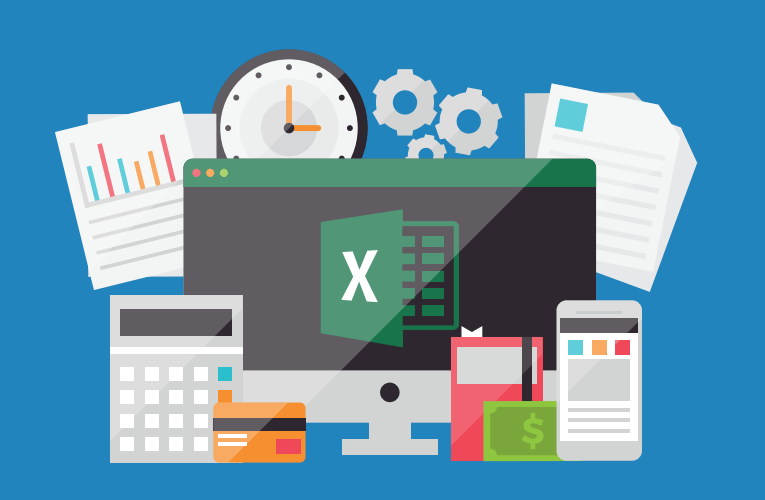
As testers, we all worked with Excel at some point in our career. If you are using
excel now this article is for you 🙂 Excel is used as test management, documentation
and reporting tool by many test teams. At early stages, most teams rely on excel
spreadsheets for planning and documenting tests, as well as reporting test
results. As teams grow, sharing information using excel sheets becomes problematic.
What used to be easy and intuitive, becomes very challenging. Encountering
difficult work scenarios like the below, becomes a day-to-day reality:
The simple task of figuring out which excel has the test cases you need to run, takes longer and longer.
Gathering the status of the testing tasks and your project can only be done by going to each desk one by one and asking them.
A tester mistakenly spent 6 hours running wrong tests in the wrong environment because of an incorrect excel sheet which was not the updated copy.
Tester’s routinely lose their work or test results because of saving/ overwriting or losing their excel sheets.
Most test activities are not being documented or accounted for because writing tests is considered a luxury.
If one or more of these scenarios sound familiar to you, you are being held back in
your testing efforts by excel!
In my latest guest post for PractiTest, I have written about how excel can be a roadblock instead of a useful tool for your testing. To read the complete article, click here—->
In here I talk about issues related with use of excel in relation to
Cross environment testing is viewed as a tedious and repetitive task and is generally a challenge to accommodate within an agile life cycle. In my recent guest post for Gurock, I showcased my own experience in an agile release wherein we created a strategy for coverage of a number of test environments to support.
Using simple steps, discussions, base-lining and agreement within the scrum team, we created a scalable interoperability test strategy which was later supplemented with automation and other tools. In this article I have talked about-
“5 Ways DevOps complements Agile” – As an industry practitioner who has worked in agile for almost a decade now, I have always seen DevOps as a friend and an extension of agile. Using this article I have tried to put across my view on how this handshake between developers and operations personnel works in favor of bridging the gap from software creation to software delivery.-
Software impacts human lives – let us put more thought into it!
Here is what happened and my take on how software design may have been partly responsible and could be improved >>
Miami Shocked!
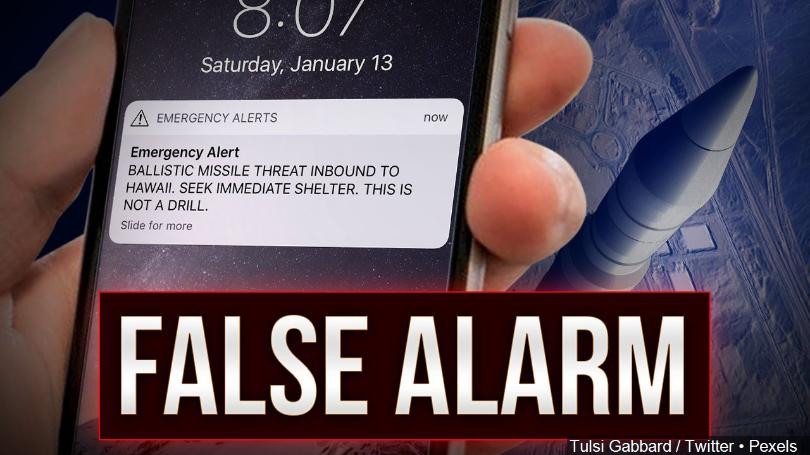
Miami state in the US received a massive panic attack on Saturday the 13th of January 2018. More than a million people in Hawaii were led to fear that they were about to be struck by a nuclear missile due to circulation of a message sent out by the state emergency management. The message sent state wide just after 8 a.m. Saturday read: “BALLISTIC MISSILE THREAT INBOUND TO HAWAII. SEEK IMMEDIATE SHELTER. THIS IS NOT A DRILL.”
The residents were left in a state of panic. People started scrambling to get to safe places, gathering supplies and even saying their goodbyes. Some took shelter in manholes, some gathered their kids into the most sheltered rooms in their homes like bathrooms or basements, some huddled in their closets and some sent out goodbye messages to their loved ones.
Turned out it was a false alert. Around 40 minutes later, the agency sent out another message saying that it was a false alarm sent out by mistake!
The questions being asked was – how could this happen and why did it take 40 minutes to check and issue an all clear?
Why Did This Happen?
Investigations into the incident were revealed and the governor stated that “It was a procedure that occurs at the change of shift which they go through to make sure that the system is working, and an employee pushed the wrong button.”
The error occurred when, in the midst of a drill during a shift change at the agency, an employee made the wrong selection from a “drop-down” computer menu, choosing to activate a missile launch warning instead of the option for generating an internal test alert. The employee, believing the correct selection had been made, then went ahead and clicked “yes” when the system’s computer prompt asked whether to proceed.
Analysing the Root Cause
But is the fault only at human level? The software being used for such critical usage also needs to help out to avoid the possibility of such human errors.
After all triggering such a massive state-wide emergency warning should not have been as simple as push of a wrong button by a single person!
Could a better design of the software have prevented this kind of scenario from happening?
As reported, the incorrect selection was made in a dropdown – which lets imagine would look something like this-
Miami State Emergency Sample System
After the selection was made, the system sent a prompt and the employee, believing the correct selection had been made, then went ahead and clicked “yes”.
So by this information we can assume that the prompt would have been something generic like
Miami State Emergency Sample Prompt
Though it definitely is a human error but isn’t the system also at fault for letting this happen so easily?
Better Design Ideas – More Thought – Improving Your Software
By putting in some extra thought into design of the software we can make it more robust to avoid such incidents.
Here are some things that could have helped design it better –
Do not have the TEST options placed right next to the ACTUAL emergency options!
Have different fields or perhaps different sub menus inside the dropdown as categories.
Segregating the Actions in the dropdown into categories
>> Always have the TEST category of warnings higher up in the list
>>Have the Default Selection in the dropdowneither as BLANK or as one of the TEST warnings and not the actual ones
>>Having the actual warnings section lower down and separated away from the similarly worded TEST warning would ensure lower chance of wrongful selection of the similar named option from the dropdown
The prompt message must be made unique to each scenario and in case of selecting a real warning issue action, the prompt must ask the user to specify the emergency.
Unavoidable Prompt with explicit message
>>Make the prompt appear critical with use of color and text
>>A critical prompt must catch the user’s attention and not be similar to the other screens and popups of the system, to avoid the possibility of clicking on it in a hurry.
>>Placement of Yes and No buttons on unusual sides (Yes is on the left which is not typical) avoids the click of the button – also used Red and Green to signify the importance situation. Red is the usual code for danger.
Additional level of authorisation must be added to the scenarios of real emergency warnings being issued. So, for the TEST actions, user may proceed and begin the drill but in case they select ACTUAL warning then the steps take it to another level of authorisation where another employee – a peer or a senior- reviews the action and performs the final warning issue.
>>This prevents erroneous actions and also some possibility of hackers or notorious people issuing false warnings just by gaining access via one user.
>>Define your hierarchy of users or approvals for each case of emergency.
These ideas may sound basic but all these are components of good Usability of the software, its appropriateness of purpose and setting up basic security in usage of the application.
We are just playing around human psychology, easier understand-ability and attention spans.
Let us endeavour to give a little more ‘thought’ to the system
It is my pleasure and honor to share that my article on
“Let the Agile Manifesto guide your Software Testing”
published on Techwell Community forum http://www.stickyminds.com in 2017 has now been featured in the list of “Hottest Articles of 2017” , featuring in the Top 10 Most Read articles last year!














 testwithnishi